Here is the recording link.
Recording link: https://cpaaustralia.webex.com/cpaaustralia/ldr.php?RCID=c966b8bfe97ecc0528138e2636457c65
Recording Password: ExcelWebinarSeries2025
I couldn't cover all the questions in the session - they are listed below.
Q: How can you find the number behind a date in Excel?
A: In the session I showed that a date has an underlying number. To see that number you must remove the format from the cell. To do that select the cell and press in sequence Alt H E F which removes the format.
Q: Does XLOOKUP still use a lot of processing power making it inefficient over larger number of rows?
A: Not really. Calculation speed is rarely an issue with computers these days. If you are working with hundreds of thousands of rows in Excel calculation speed will be affected, but that isn’t a reason not to use a function. I think all the lookup function now work quicker now that previous versions.
Q: for 3d function - every unique cell in every sheet has to be on same cell place - right ?
A: Yes, the cell reference must be the same across all sheets.
Q: Just a question regarding the XLOOKUP, where you showed you can use IF function to show "error" or "missing" can we do the same if we are only using IF function?
A: Yes, I used the IF function with the XLOOKUP function but you can use the IF function on its own to identify other types of errors or issues and display a message.
Q: Hi Neale, with the 3-D Sum I note you used characters 'a' 'b' etc, but would using special characters such as < > and | also work?
A: Yes, you could you some characters but not all are legal in a sheet name. Also you can’t duplicate a sheet name, so you could only use | once to ad a space or two. But if you want to create sections and sub-sections then the alphabet has a built-in sequence which is easily understood.
Q: What type of limitations does 3-D Summing have or things to watch out for when designing templates/models.
A: The first consideration is that the top of the sheets needs to be consistent across all the sheets. The second is that the blank sheets need to stay blank. The third limitation is that the position of the sheets is important. This is the only time that position is important so you need to make sure people don’t move the sheet around unnecessarily.
Q: Does the filter formula work if you wanted to reference an entire column so you can change the original data, or add more, without having to update the range?
A: After a few goes I got this to work. I wouldn’t recommend referring to the whole column, but you can.
Q: Hi Neil, great presentation as always. Is there a presentation that covers index and match?
A: Sorry, not in this series. XLOOKUP can do much of what INDEX/MATCH is used for.
Q: Would you cover reference tables in a future session? I find them super confusing. Thanks for today session in any case!!
A: We covered Formatted Table in the first session of the series. Recording link below.
https://cpaaustralia.webex.com/recordingservice/sites/cpaaustralia/recording/playback/96b16beae1d4103dbf7776c02b347b11
Password is ExcelWebinarSeries2025
Other sessions are lists in the link below.
https://cpamemberconnect.cpaaustralia.com.au/viewdocument/webinar-recordings-available?CommunityKey=e985d16c-f25d-4227-8ec9-21826edf368c&tab=librarydocuments
Q: Can you use the UNIQUE function to create a list of all unique values from multiple worksheets?
A: Yes, we did this in the session with the help of the VSTACK function.
Q: Does the subtotal function work with filter?
A: It depends on how you mean to use it. SUBTOTAL works on a normally filtered list, but the FILTER function returns a separate spill range of results. But in general, yes you should be able to use FILTER and SUBTOTAL together.
Q: will spill works if there are gaps in data
A: Spill ranges can handle empty cells.
Q: can you explain the unique function on the diff between col C & E again? don't quite understand the diff. thanks.
A: The first unique example returned a list of every code in the list with no duplicates. The second example was a list of codes (there was only one) that appeared in the list once.
Q: for the sum start to end, it can only apply to same cell? eg each sheet have different lines.
A: The cell references must be the same in all the sheets.
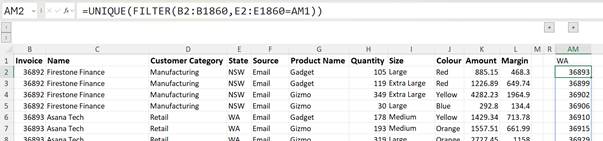
Q: Is there an easy way to run the equivalent of what would be a UNIQEUIF function? That is, to return any unique items from a Column, but only where they meet a specified criterion?
A: Yes, you could use FILTER to filter a list by a condition and wrap the UNIQUE around the FILTER and extract the entries. In the example below in the Sales Data sheet I have listed the unique invoice numbers for WA.
Q: An Excel sort question - How does one sort a column of alpha-numeric cells to get the expected result of B1,B2,B10; instead of getting the result of B1, B10, B2.
A: Sorry, you need to modify the codes to include leading zeroes for the numbers for e.g. B01 and B02 for Excel to sort as expected.