During the session there where a few layout-related questions.
Question:
Is there a way to always show the classic pivot presentation by default instead of having to change it via pivot table options/display/ each time a pivot table is created?
Yes, in the File>Options>Data section - click the Edit Default Layout button. Click the PivotTable Options button and open the Display tab and click the Classic PivotTable option – click OK and OK and OK again.
Next Pivot you open will use the Classic Pivot layout.
Question:
Hi Neale, i do normally put the commentary (let say in the colomn J) for example. however, is there any way my commentary does not move, when we release the criteria or filter ? Thanks
I answered this in the session. I recommended using a text box for the commentary. Then you can move it anywhere and it isn’t affected by the Pivot. Also text boxes are better for longer form text than a cell.
Question:
Hi Verity, I cannot see the cogwheel icon to select Pivot Table feilds in my PivotTable
If you can’t see the Cog icon you have an older version of Excel and can’t use the Field Layout I had.
Question:
Is there a way to add the same category into a filter as well as column/ row? Or it is just inherently impossible with Pivot?
No. But you can still filter using a Slicer rather than the filter section – I demonstrated this in the session. You CANNOT have a field in the Filter section AND the row or column section.
Question:
If you duplicate an existing tab with an existing pivot table and then want to show same data differently eg combine Gizmo and widgets in same column group it then changes original pivot table tab as well
Using Grouping in a PivotTable affects the Pivot Cache and hence affects the other pivot reports. It isn’t the copying that is the issue, it is the Grouping.
Question:
Can you sort the PivotTable so that the products appear in order of Total Sales (highest to lowest), rather than alphabetically by product name?
Yes, you can – right click the column you want to sort by and choose Sort Ascending.
Question:
How do you filter out zero amounts in sum value
Be careful with this – you might hide rows that have values. The left-hand column in the pivot report has the filter options. You can filter by value.
Question:
|
*Tabular selection in the design pivot ribbon
|
|
Can you explain what the Tabular format does to the pivot table?
|
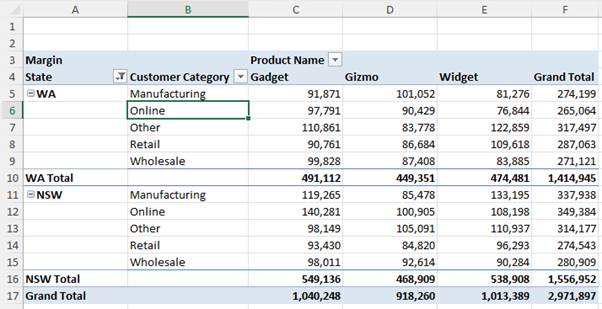
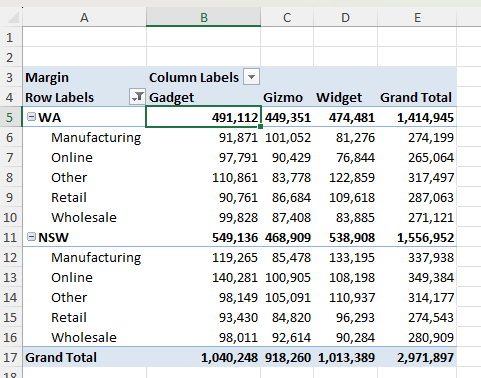
The three different layouts are shown below. The main differences are in where the totals are displayed in a hierarchy. Tabular and Outline use more columns.
Compact
Outline
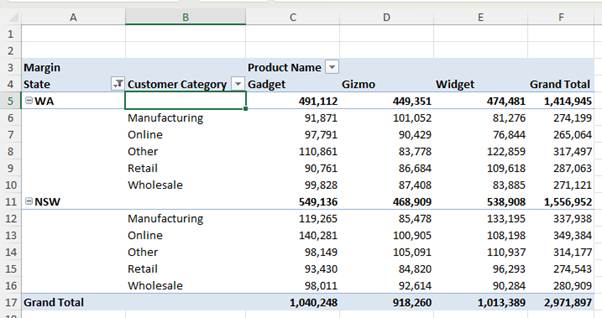
Tabular